
Creator Hub
Welcome to your Creator Hub
Every great deck begins with an idea!
For over 30 years, we have helped tens of thousands of creators, coaches, and designers turn those sparks of inspiration into something real. From the first sketch to the final printed pack, we’ve seen how a single deck can change the way people teach, share, and connect.
That’s why we built the Creator Hub, a place made just for you.
Here, you’ll find everything you need to start creating: simple tools, expert advice, and a team who genuinely cares about your project. Whether you’re building your first tarot deck, a set of coaching cards, or a brand-new game, we’ll help you every step of the way.
We’re still a family-run business, just as we were in 1994. We still get excited about every new deck that comes through our doors! And we still believe that beautiful things happen when creators are supported, understood, and empowered.
This is where your deck begins, let's get started!
Stage 1 - Artwork
Stage 2 - Test Pack
Stage 3 - Order
Stage 1 - Artwork
Module 1: How To Choose Your Product
Your Ivory Sample Kit is your hands-on introduction to everything we make, from playing cards and oracle decks to packaging and finishes. This quick guide will show you how to use it effectively to decide what suits your project best.
Step 1: Open and Explore Your Kit
Lay everything out in front of you. Inside of our Sample Kit you’ll find:
- A Beginner’s Guide explaining each product type and finish
- A range of card sizes to compare proportions
- A full example deck showing print and coating quality
- A gift voucher for your first Test Pack, on us
Lay everything out in front of you. Inside of our Mini Kit you’ll find:
- A range of card sizes to compare proportions
- A gift voucher for your first Test Pack, on us
Take a few minutes to flip through everything before reading further. Seeing and feeling the cards will make each decision easier.
Step 2: Identify Your Project's Purpose
Ask yourself what is your deck for?
- Playing Cards or games: Standard playing card (Poker) size works best.
- Tarot or oracle decks: Larger sizes showcase artwork beautifully.
- Educational or coaching cards: Consider A7 or Large Tarot sizes for practicality.

Step 3: Compare Card Finishes and Thickness
Your Sample Kit includes Ivory’s three FSC-certified laminated materials. Handle each and choose the feel that suits your project:
- 320gsm Heretic (Smooth): Balanced flexibility and durability with a clean, smooth surface. A reliable choice for Poker and Bridge-style decks, games, and general use. Only available on card sizes smaller than A7 (74 x 105mm).
- 320gsm Sureslip (Textured): Similar body to Heretic but with a unique textured finish that enhances grip and handling; ideal for magicians, cardists, or anyone who values tactile control. Only available on card sizes smaller than A7 (74 x 105mm).
- 410gsm Tusker (Premium): A thicker, luxury board with exceptional rigidity and vibrant print clarity. Perfect for Tarot, art-forward or full-bleed designs, and premium presentation. Available on all card sizes, excluding Poker (63 x 88mm).
Under good lighting, flex each stock and shuffle a small stack. Choose the material that feels right for how your cards will be used.
Step 4: Review Box and Packaging Options
Your Sample Kit helps you see how your finished deck might be presented. The box you choose sets the tone for your entire product; from affordable practicality to premium retail presentation.
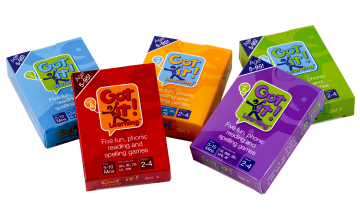 Tuck boxes are the most popular choice for standard playing cards, flashcards, and affordable custom decks. They’re made from sturdy printed card and finished with your artwork on the outside. Available in matte, gloss, or textured laminates, tuck boxes strike the perfect balance between practicality and presentation. They’re lightweight, compact, and easy to handle, ideal for decks that will be carried, gifted, or used regularly. If you want a simple, budget-friendly solution that still looks professional, a tuck box is an excellent choice.
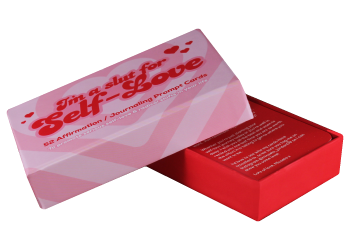 Rigid boxes offer a luxury unboxing experience. Crafted from solid board and wrapped in your custom printed design, they deliver exceptional strength and a premium finish. Available in matte or textured laminations, rigid boxes can be fully tailored in size, shape, and finish to elevate your brand’s presentation. They’re perfect for high-end, collector, or retail-ready decks where durability and visual impact matter most. If you want your packaging to stand out and add a sense of prestige, this is the ideal choice.
Visit our blog post Rigid Boxes vs Tuck Boxes for a detailed comparison. It includes photos, pros and cons, and in-depth guidance on choosing the right packaging for your project.
Stage 1 - Artwork
Module 2: Templates & Guides
Creating the perfect printed product starts long before ink touches paper, it begins with the right template. Ivory’s templates are designed to make every stage of artwork setup easy, accurate, and stress-free. Whether you’re designing playing cards, boxes, books, or custom packaging, these step-by-step guides and ready-to-use files ensure your project prints perfectly the first time.
Our comprehensive guides explain how to download and use Ivory’s templates, even if you’ve never prepared artwork for print before. You’ll learn how to choose the right template, how to work with different file formats, and how to confidently set up professional artwork from start to finish.
Step 1: Download Your Templates
The Template Calculator is one of our favourite tools! It instantly creates custom templates based on your exact product specs.
How It Works
- Select your product type (card, paper insert, and or packaging).
- Choose your size and material thickness.
- Click Calculate Templates: your custom templates will be generated automatically.
- Download in your preferred file format.
All of our templates are available in 6 different formats:


- AI : Adobe Illustrator.
- IDML : Adobe Indesign.
- PSD : Adobe Photoshop.
- CANVA : A .psd that can be imported into Canva.
- PDF : Standard file format that can be opened in most graphic editors.
- SVG : Inkscape or various vector software.
Step 2: Download Artwork Guides
Each template ensures perfect alignment, bleed, and corner rounding for professional decks. With Ivory’s templates, your artwork will print centered, uniform, and ready for professional finishing.
Available Guides
Step 3: Move On To File Set Up
Once you’ve downloaded your templates and guides, you’re ready to begin designing. File setup is a crucial step in the design process, which we'll walk you through in the next module.
Stage 1 - Artwork
Module 3: File Setup
Step 1: File Setup
We want your artwork to print perfectly and getting the setup right makes all the difference. Our family-run team recommends using Adobe Illustrator, InDesign, or Canva, as these programs work seamlessly with our print templates.
To make things easy, we’ve put together a File Set Up Guide that walks you through everything from bleed and colour mode to layout tips. Download it to ensure your design arrives print-ready and looking its very best.
Download GuideStep 2: RGB vs CMYK
When preparing artwork for printing, it’s important to understand how colours are created and reproduced. Digital screens use light to display colours, while printers use ink – meaning the same colour can look very different once printed. To achieve accurate, professional results, artwork must be set up in the correct colour mode for print. The standard for this is CMYK (Cyan, Magenta, Yellow, and Black), which is specifically designed for how inks blend on paper to produce realistic and consistent colours.
Learn more: About getting the best results from your artwork and ensuring colour accuracy in print, by downloading our CMYK vs RGB Guide.
Download GuideStep 3: Exporting Files
Before exporting, check these universal settings:
- Resolution
- Always export at minimum 300 DPI. This ensures your images print sharply and your text stays clear. Anything lower can look blurry or pixelated.
- Colour Mode
- Use CMYK (Cyan, Magenta, Yellow, Black) for print. RGB is for screens, colours shift or appear dull once printed if you don’t convert.
- Bleed
- Include at least 3 mm bleed on all sides. Bleed is extra space beyond your design edges so there are no white borders after trimming.
- Fonts
- Either embed your fonts in the PDF or convert text to outlines so nothing changes or reflows during printing.
- Compression
- Keep image compression to a minimum. Choose “High Quality Print” or “Press Quality” presets where available.
Once your PDF looks right, it’s ready to upload with your order or send for proofing. Take a quick moment to re-check dimensions and trim marks, and you can be confident your design will print beautifully.
Stage 1 - Artwork
Module 4: What does FSC®, UKCA, CE and GPSR mean?
What is FSC®?
FSC® certified products
available upon request.
The FSC® (Forrest Stewardship Council), is a non-profit organisation that makes a chain of custody from a sustainable source to the manufacture of our paper to delivering to our factory. Our certification, which we gained in 2012, allows us to pass this chain of custody onto our clients. This is done with certification on your product, invoices and delivery notes.
Below are all of the FSC® logos that can be added to your product. Before we print, we send your artwork for approval by FSC® for your placement of these certification marks.
Ivory Graphics Ltd FSC® Certification Code: CU-COC-822090
FSC® certified products
available upon request.
What is UKCA?

The UKCA marking is a declaration that your pack has been tested to comply with safety legislation for toys in the UK (England, Scotland, or Wales).
Does my pack need the UKCA mark? Playing cards fall under the UK's Toys Safety Regulations. Which means that the UKCA mark is a legal requirement for you to sell your pack in the UK.
Oracle, tarot, and other divination cards also require the UKCA mark even if they are not specifically designed for use by children. Since the base product of these are personalised cards, this also falls under the UKCA umbrella. We highly recommend adding the UKCA mark on your oracle or tarot deck.
Without the UKCA marking, a vendor may refuse to sell your pack until tested at your expense. The penalty for not using the UKCA mark can also include a fine or imprisonment in extreme cases.
No, we submit all of our products for testing annually with an accredited laboratory to ensure your product can be classified as toy safe and are eligible for the UKCA mark.
On your pack's packaging, but if there is not enough room you can also place this on a extra card or leaflet/book inside the pack. You will also need to include an address alongside the UKCA mark, this can either be the distributor's (yours) or the manufacturer's (ours).
What is CE and GPSR?

The UKCA marking is not recognised in the EU, so cards that are sold in the EU will need a CE marking and be GPSR compliant. We ensure all our products comply with GPSR, CE marking, and other applicable EU Directives, so that you don't have to. Our EU Responsible Person for GPSR product safety compliance is EU Compliance Partner.
Yes, if you are selling your product in the EU then it must be CE and GPSR compliant as of December 2024. This is a legal requirement for selling in the EU, not ensuring you have the correct markings and documents means that marketplaces can decline to sell your product.
No, we submit all of our products for testing annually with an accredited laboratory to ensure your product can be classified as toy safe and are eligible for the UKCA, CE marks and GPSR.
Label your products with the manufacturer’s contact details (usually your own) and the Responsible Person information from the certificate. Include a postal address and an electronic contact (email or website). If space is limited, the Responsible Person details can be on the product, packaging, parcel, or an accompanying document.
Stage 2 - Test Pack
Module 1: Order Your Test Pack
Step 1: Request Test Pack Quote
You’ve already chosen your card size, material, and box type, so now you're ready to request your Test Pack quote.
Include in your message:
- Deck size (e.g. Tarot Size)
- Number of cards in the deck
- Card stock (e.g. Tusker)
- Paper Inserts (e.g. Perfect bound book)
- Box type (e.g. Rigid)
Our team will review the details and email your Test Pack quote.
Don’t send artwork just yet. Wait for your quote link so your files are attached to the correct job reference.
Step 2: Order Test Pack
Once you receive your Test Pack quote, click the secure link and follow the Buy Online process.
- Complete Billing and Delivery Addresses
- Confirm UKCA and CE instructions
- Write a message to our team
- Make payment (skipped for free Test Packs)
- Upload files
Compress large files into a single ZIP folder to prevent timeouts.
Stage 2 - Test Pack
Module 2: Upload Files
Once you receive your Test Pack quote, click the Upload Files at the end of the Buy Online process to access the Artwork Uploader. This is where you’ll upload all your files and connect them directly to your order.
To make things easy, we’ve put together an Upload Files Guide that walks you through how the Uploader works and every step to uploading your files, ensuring that everything transfers correctly.
Can't find your Upload link? Visit www.ivory.co.uk/upload
Stage 2 - Test Pack
Module 3: Digital Proofs
After your artwork has been uploaded and checked by our Studio, you’ll receive an email with a link to your digital proof. This proof allows you to review exactly how your deck, box, and all printed components will appear before production begins.
Before approving, we recommend reading our Digital Proof Guide, which explains what to look for and how to spot common issues such as alignment, bleed, and spelling mistakes.
What to Check Carefully:
- Confirm artwork placement, orientation, and numbering
- Check alignment and text positioning
- Make sure no text or key artwork is too close to cut line.
- Check for spelling mistakes
You’ll need to sign off on every component before your order moves into production. Approval confirms you’ve checked all files and are happy to proceed.
Remember digital proofs can only show approximate colour since they are displaying in RGB. Once you receive your printed Test Pack you will see how your colours print.
Stage 2 - Test Pack
Module 4: Review Your Test Pack
Your Test Pack will be delivered at the address you provided within 11 working days.
- Check alignment and text positioning
- Check for spelling mistakes
- Colour accuracy under daylight
- Card feel
- Box fit
Make notes of any tweaks you’d like for full production, whether it's artwork changes or adjustments to the product itself.
Stage 3 - Order
Module 1: Get Your First Quote
Step 1: Decide What You’re Actually Quoting For
Use your Test Pack as a reference. Write down your specification in plain language:
- Card size
- Number of cards per deck
- Material
- Box type
- Any extras (guidebook, foiling, etc.)
- Deck quantity (e.g. 500, 1,000, 2,000)
Step 2: Send Your Quote Request
How It Works
- Go to the Quote Request Page
- Choose What Your Cards Are For
- Pick the category that fits your project
- Enter the Core Details
- Card size
- Personalisation
- Cards per deck
- Material
- Box type
- Any extras
- Quantities
- Add Your Contact Information
- Submit Your Request
Add your deadline if timing is important.
Step 3: Review Your Quote
When your quote arrives, check the basics:
- Quantities and specs match what you asked for
- All components are listed (cards, box, inserts, extras)
- Shipping/delivery country is correct
Check out our FAQ page to help answer any queries.
Skimming the quote and then being surprised later by something you hadn’t noticed. Take 5 minutes now to read it slowly.
Stage 3 - Order
Module 2: Place Your Order
Once you receive your quote, click the secure link and follow the Buy Online process.
- Complete Billing and Delivery Addresses
- Confirm UKCA and CE instructions
- Write a message to our team
- Make payment
- Upload files
Stage 3 - Order
Module 3: Digital Proofs
After your artwork has been uploaded and checked by our Studio, you’ll receive an email with a link to your digital proof. This proof allows you to review exactly how your deck, box, and all printed components will appear before production begins.
Before approving, we recommend reading our Digital Proof Guide, which explains what to look for and how to spot common issues such as alignment, bleed, and spelling mistakes.
What to Check Carefully:
- Confirm artwork placement, orientation, and numbering
- Check alignment and text positioning
- Make sure no text or key artwork is too close to cut line.
- Check for spelling mistakes
You’ll need to sign off on every component before your Test Pack moves into production. Approval confirms you’ve checked all files and are happy to proceed.
Remember digital proofs can only show approximate colour since they are dispalying in RGB. Refer back to your printed Test Pack to see how your colours print.
Stage 3 - Order
Module 4: Enjoy Your Order
Congratulations, you did it!
Your idea is no longer just a concept, it’s a real, beautifully printed creation, straight from your imagination to your hands. Take a moment to unbox your order and enjoy the results of all your hard work. Whether this is your first project or the start of many, you’ve just joined the Ivory family of creators who bring their ideas to life through print.
Celebrate this milestone! ✨
Snap a photo or video of your unboxing, we'd love to see!
Tag @ivorygraphicsltd on Instagram or your favourite social media and show off your creation.
Store, Sell and Plan Your Next Run
Once you're ready:
- Store your decks somewhere dry, safe and stable
- Add them to your website, store, crowdfunding fulfilment system or distribution channels
Make notes on:
- Which quantity worked for you
- How quickly you expect to need a reprint
- Any tweaks for a future edition (e.g. rule clarifications, colour adjustments)
Keep your final, print-approved artwork and specs in a clearly labelled folder. Reprints or expansions later will be much faster and simpler.